How GoPals works
A plain-language walkthrough of joining a group, the shared pool, your profile and the Group Fund, plus, further down, everything a group admin can do. Nothing here is required reading; most people just start using the app and come back here when something's unclear. This page is open to anyone, you don't need to be signed in to read it.
What's new, October 2026
The Group Fund is here: money the group owns, with its own statement. Admins can settle a Quick Split expense with the fund, and the fund can pay recurring bills.
- Admins can now Void a mistaken entry, with a reason. See Amend or void an approved entry.
- Corrections show on the statement as a minus line. Nothing is ever deleted.
- Only the person who added an expense, or an admin, can edit or delete it.
GoPals signs you in with your Google or Apple account, there's no email/password option. The first time you sign in, GoPals creates your profile automatically from the name and email your provider gives it. There's nothing else to set up before you can join or create a group.
1. "Request to Join" on a group's public page
Some groups publish a public page at gopals.app/<group-name> with a bit of info about the group and a "Request to join" button. Tapping it (after signing in) sends a request to that group's admins, who can approve or deny it from their Admin screen. This path requires an admin's approval before you're added.
2. Added directly by an admin
An admin can add you to a group just by entering your email address, no link involved. Nothing happens until you actually sign in with Google. The moment you do, if your Google account's email matches what the admin entered, you're joined to that group automatically and silently. You don't need to do anything to accept it.
Logging a contribution
Tap + Add Contribution, enter the amount and an optional note. If you're a regular member, your entry sits as pending until an admin confirms it happened before it counts toward any balance. If you're an admin, logging your own contribution counts immediately, since your confirmation is the confirmation.
Requesting a refund
Request Refund is self-serve, but capped at your own available balance, so you can't request more than you're actually owed. It goes to an admin as a pending request, same as a contribution, before it's paid out.
The Pool Statement is visible to everyone
Every entry in the Pool Statement, contributions, refunds, notes, dates, and status (pending/approved/rejected), is visible to every member of the group, not just admins. There's no private view; if you're in the group, you can see everyone else's pool activity, and they can see yours.
Fund or Pool: what's the difference?
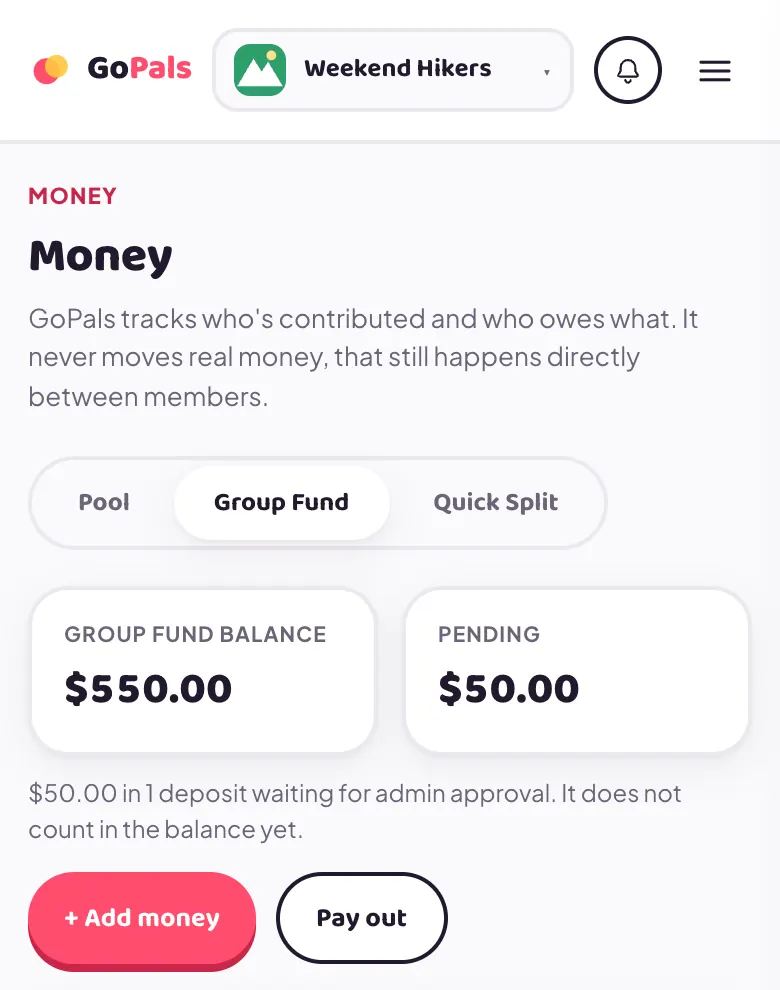
The Pool holds money that belongs to members: you put it in, and it is held for you. The Group Fund is owned by the group: fees, donations and grants come in, and the group spends it on things like events and bills. Once money is in the fund it is no longer anyone's personal balance. Tracking who has paid their dues is not part of the fund.
Adding money to the fund
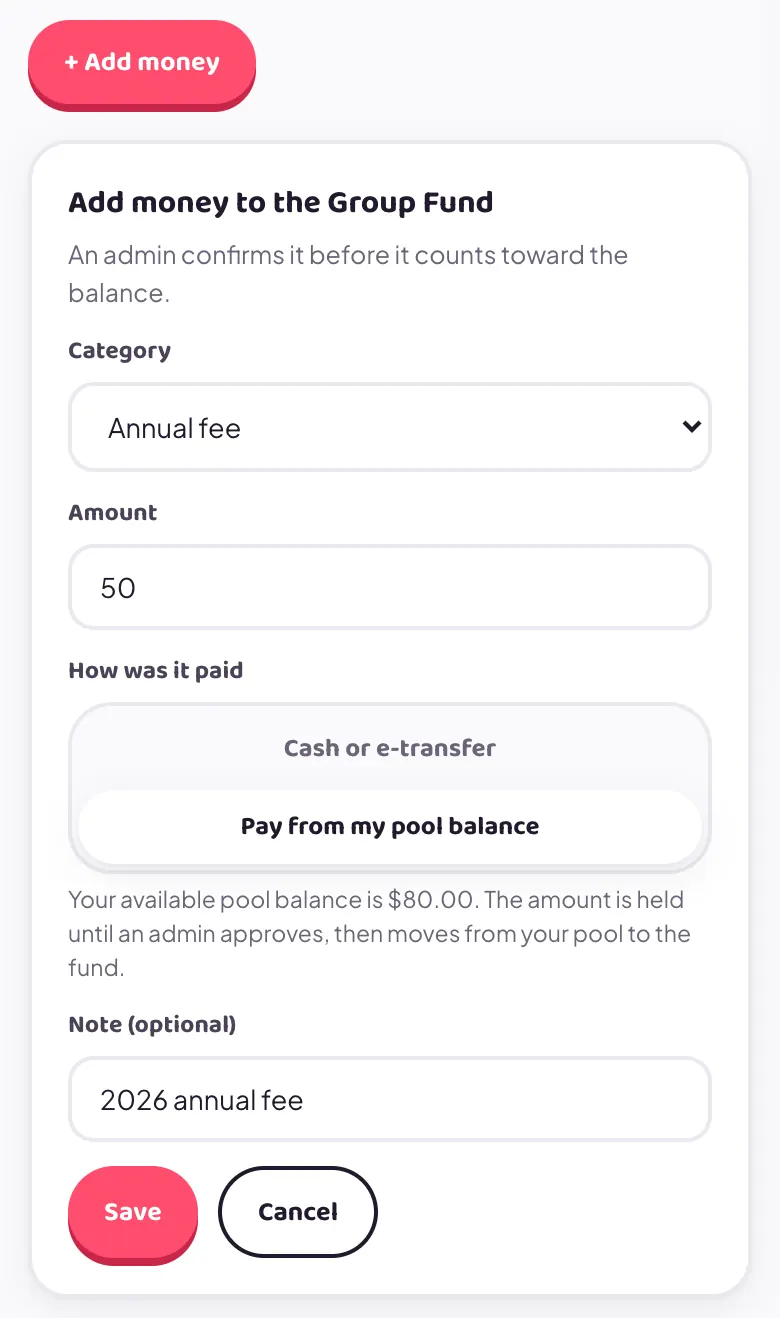
Tap + Add money and pick a category: Membership fee, Annual fee, Donation, Government grant or Other. Other needs a note saying what it was. Enter the amount, then choose how it was paid.
When you add money yourself, it shows as Pending until an admin approves it. Pending money is shown in the Pending box and does not count in the balance yet.
If you have a balance in the Pool, choose Pay from my pool balance. That amount is held until an admin approves, then it moves from your pool to the fund. The other choice, Cash or e-transfer, means you paid the group outside the app.
The Group Fund Statement
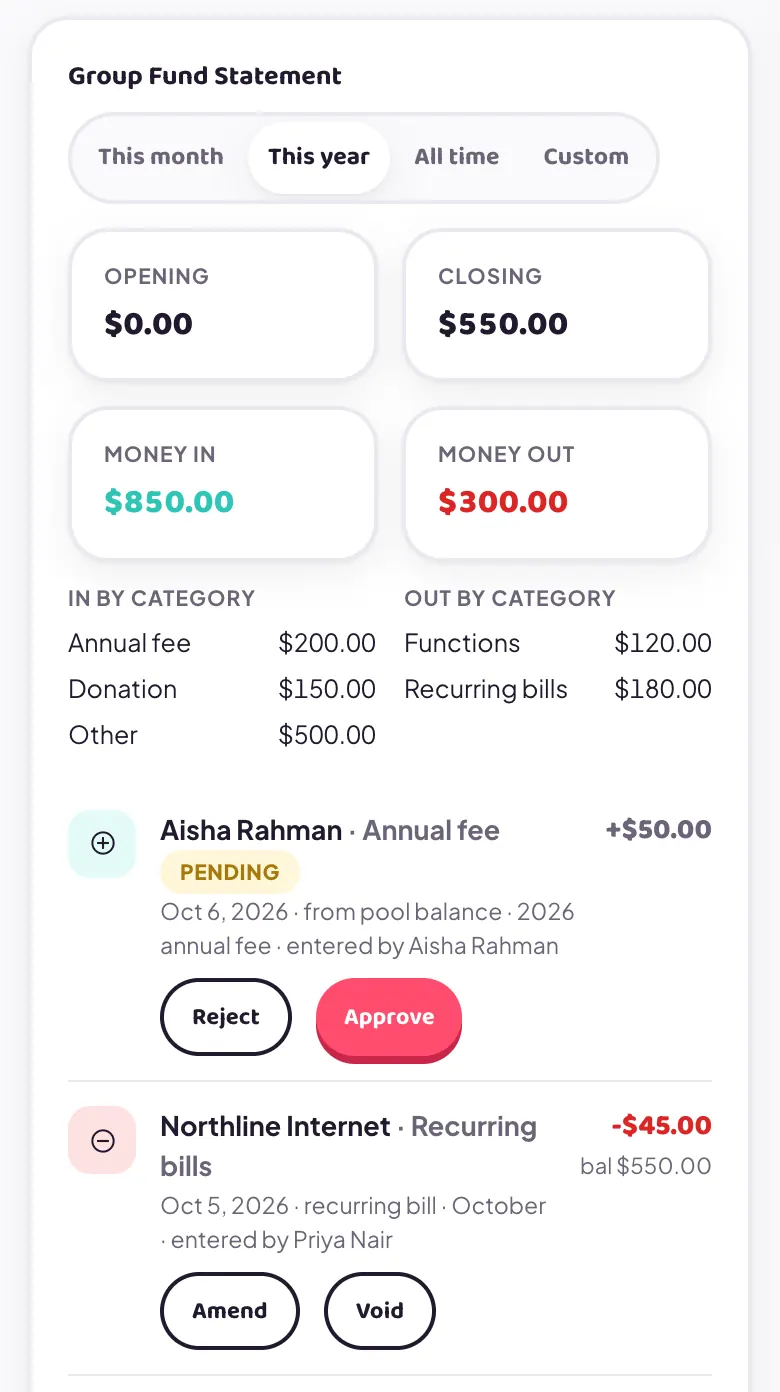
Every member can see the fund's statement: each entry, who it was for, its category, and the balance after it. Choose This month, This year, All time or Custom dates. At the top you get the opening balance, closing balance, total money in and out, and a breakdown by category. A pool-funded fee also appears in the Pool Statement as a minus.
Money out of the fund
Only admins pay money out. The categories are Functions, Recurring bills, Sponsored events and Other. The fund can never go below $0.00.
A worked example
The Weekend Hikers start the year with an opening balance of $500. Four members each pay a $50 annual fee, so the fund is $700. A sponsor gives $150 (Donation): $850. Priya pays $240 for a team dinner and the group decides the fund covers 50%, so the fund reimburses her $120. The internet bill is paid by the fund every month at $45. After four months of that, the balance is $550.
Change your display name and photo from the top of the Profile screen. Below that, a Contact Card holds phone, birthday, emergency contact and home address, all optional, all edited by you, all visible only to your own group's members (never public, never to a group you're not in). Emergency contact and home address are the most sensitive fields there; they're kept to that same members-only visibility.
Add by email
You pick the specific person by typing their email address, and they join automatically the moment they sign in with that matching Google account, no approval step on your end beyond having typed the address. Full detail below in "Adding Members by Email."
How the match works
Paste one or more emails (comma or newline separated) and tap + Add. Nothing happens until that person actually signs in with Google. The moment they do, GoPals checks their Google account's email against your pending list, and joins them automatically if it matches. No link, no token, no approval step on your end beyond having typed the address in the first place.
The match has to be the person's exact Google account email, typed exactly. GoPals does not currently normalize the address in any way before comparing it.
firstlast@gmail.com and first.last@gmail.com as the same inbox, but a person's actual Google account has one fixed, canonical email string. If you type the address with different dot placement than that canonical form, the match will silently fail to fire. Mail would still reach them either way, but GoPals' matching won't. This is a known, currently-unfixed gap, not something already handled behind the scenes. If someone you added never seems to join, this dot mismatch is the first thing to check: try removing or adding dots and re-adding the address.Emails are actually sent
Adding an address queues a real invite email (sent via Resend) telling them they've been invited. If one didn't go out for some reason, or you're re-sending to someone who missed it, a Resend button on that pending row sends it again.
New groups default to a 50-member cap. It's checked at the moment someone would actually join: an admin approving a join request, or an email match firing on sign-in. Either of those simply fails with "This group is full" once the cap is hit. There's no in-app display of how close a group is to its cap today; you'd find out by hitting the limit.
Log a contribution for someone else
The Member picker on the Add Contribution form is admin-only. Logging on behalf of another member counts immediately, no pending step, unlike a regular member logging their own, which waits for approval.
Pool Approvals queue
Every pending contribution or refund request across the whole group, from every member, lands here for you to Approve or Reject.
Amend or void an approved entry
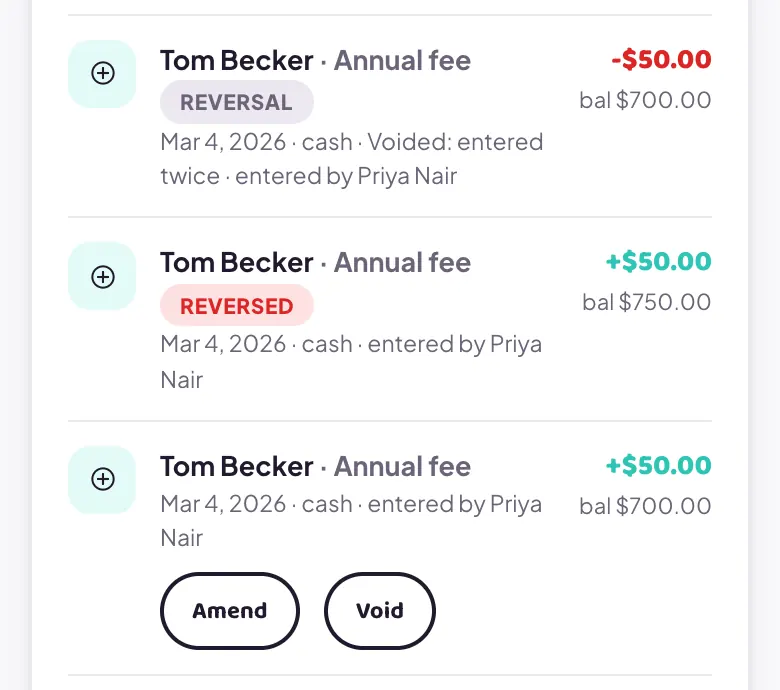
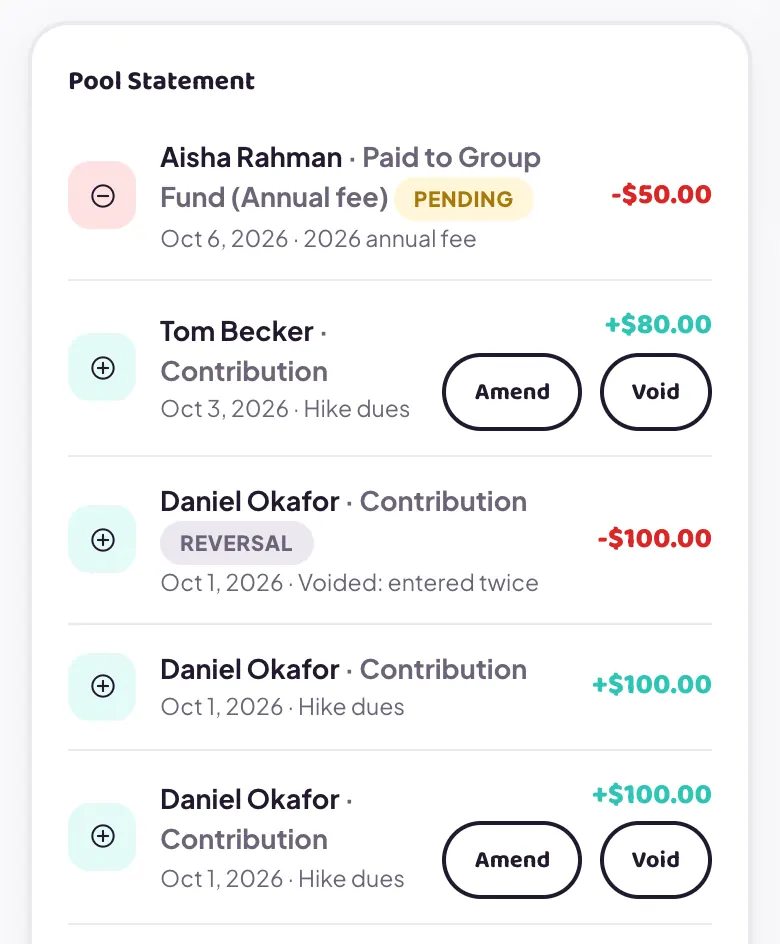
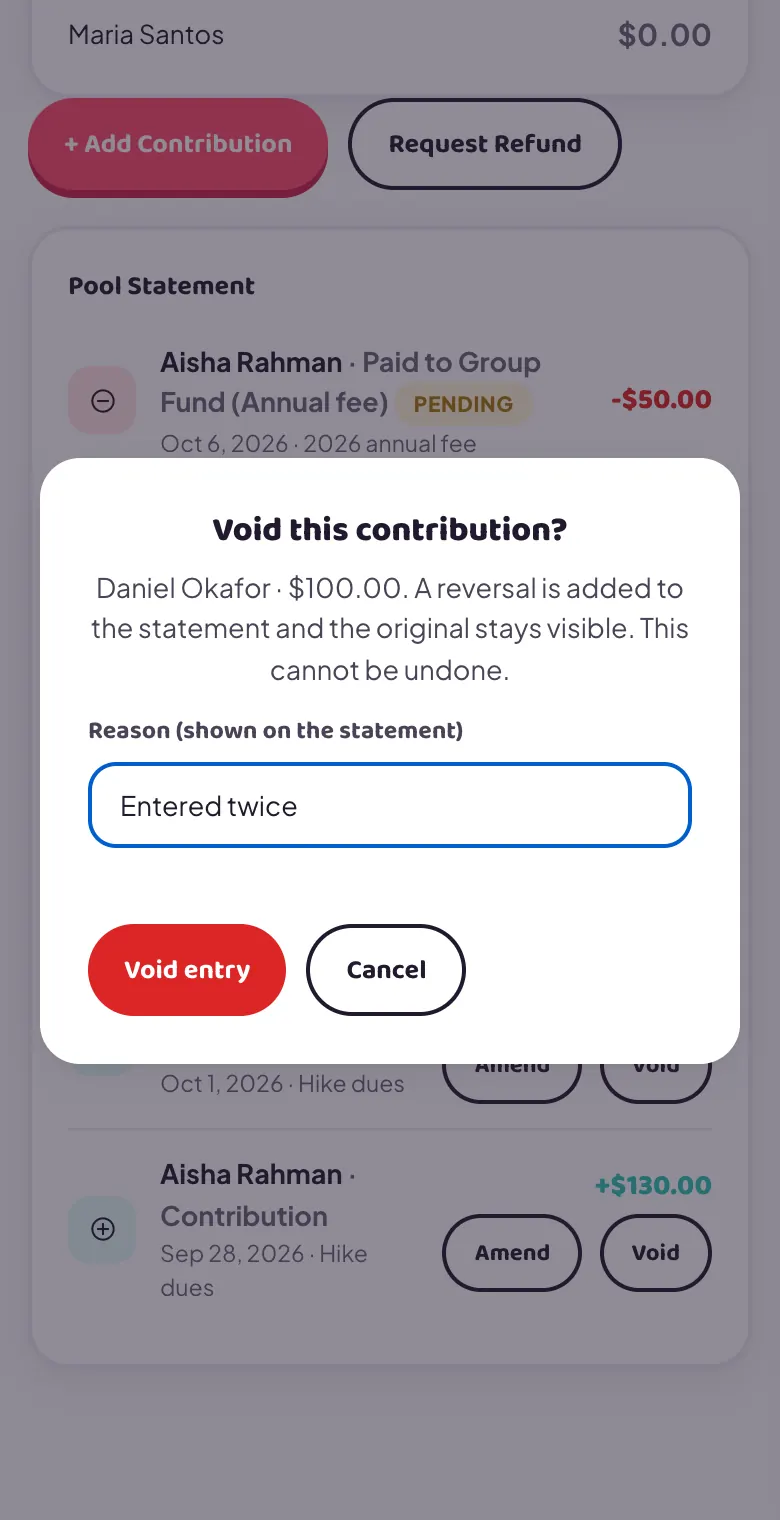
Amend doesn't edit the row in place. It posts a reversal of the original plus a fresh corrected entry, and both stay on the statement. Void cancels an entry completely: you give a reason, and GoPals adds a matching minus line. Nothing is deleted, so every member can see the full history. Use Void for duplicates.
Amend and Void only appear on entries that can still be corrected. They are not offered on a reversal, on an entry that has already been corrected, or on a line created when an activity was settled. A correction is refused if it would leave a member's balance below zero. Group Fund entries are corrected the same way from the Group Fund statement.
Who can edit an expense
Only the person who added an expense, or an admin, can edit or delete it. Once an activity's settlement starts, its expenses are locked.
Add money and approve deposits
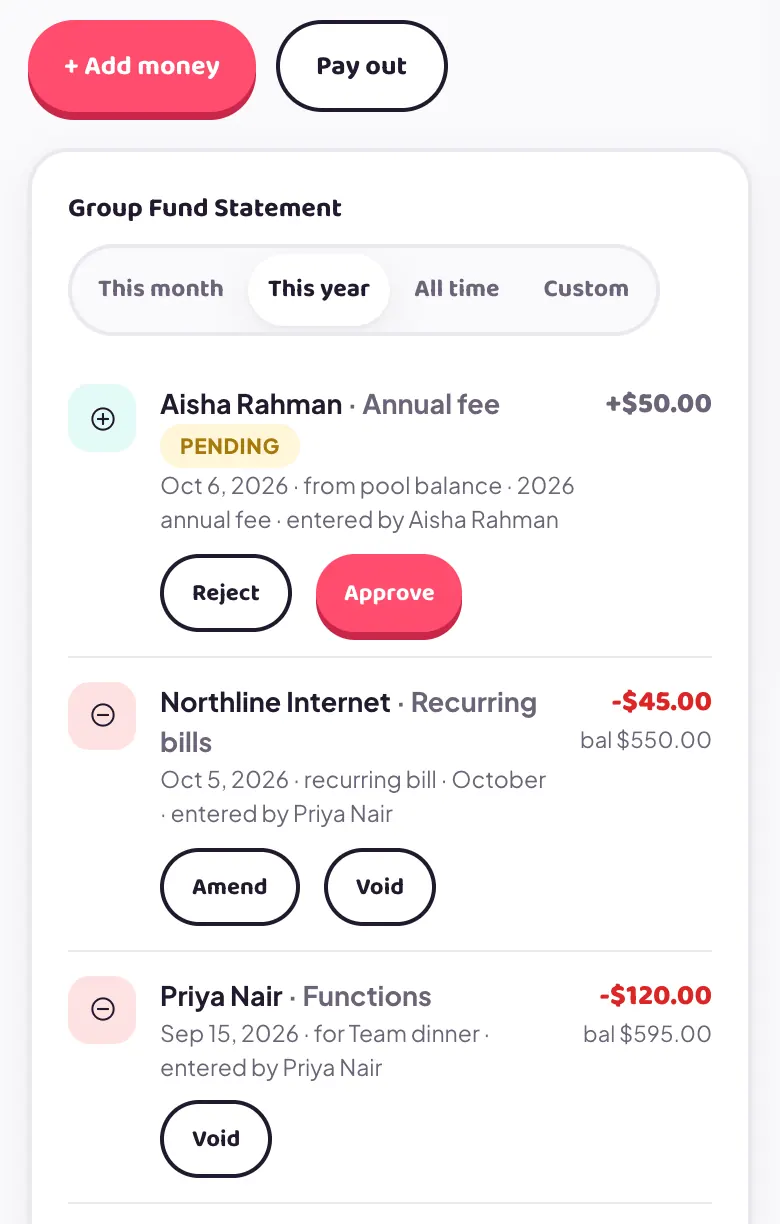
When an admin adds money it counts at once. The form lets you pick the member it came from, or an outside source such as a grant or donor. A deposit a member added shows Pending with Reject and Approve buttons on the statement. Approve it there rather than entering it again.
Paying out
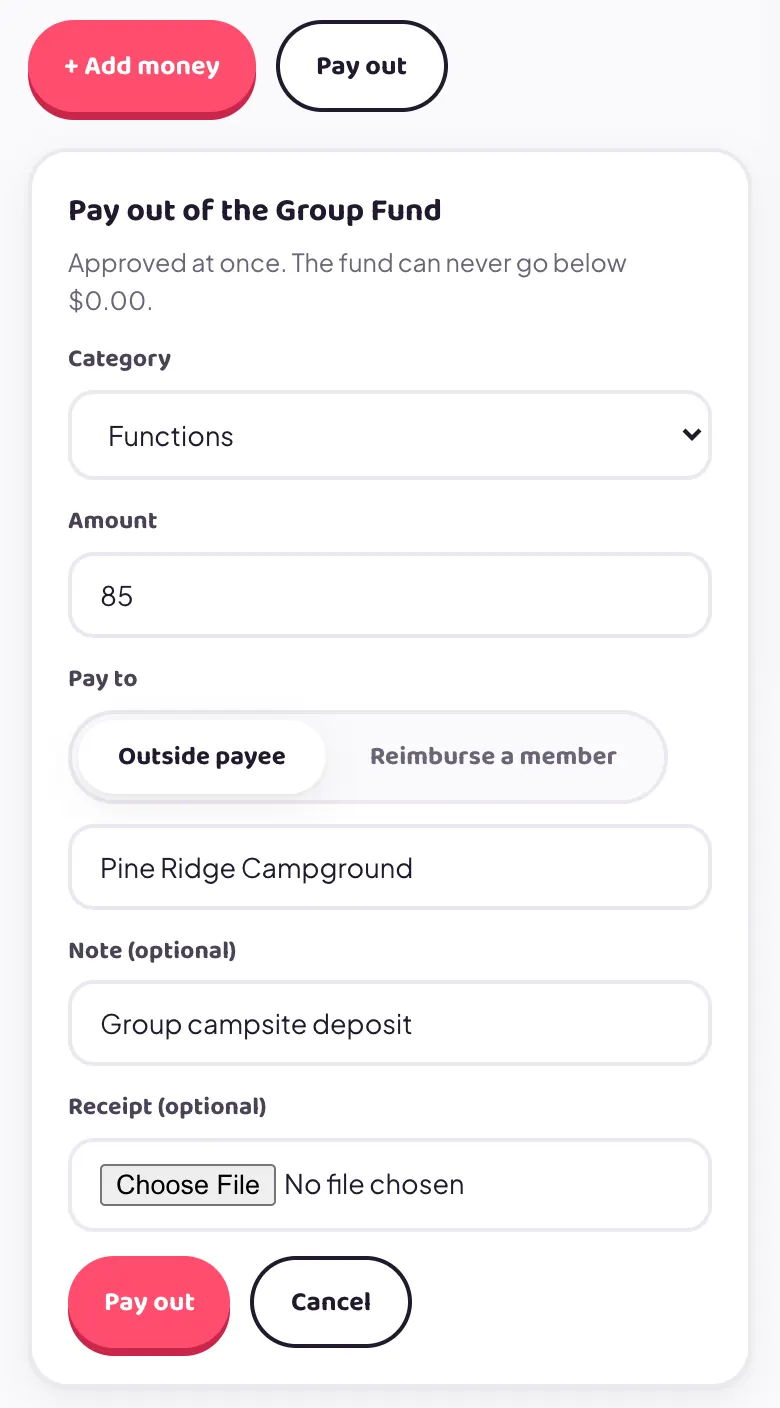
Tap Pay out, pick a category and amount, then choose Outside payee (type who is being paid) or Reimburse a member who paid upfront. Add a note, and a receipt photo if you have one. It is approved at once. If the fund does not have enough, GoPals refuses it.
Recurring bills paid by the fund
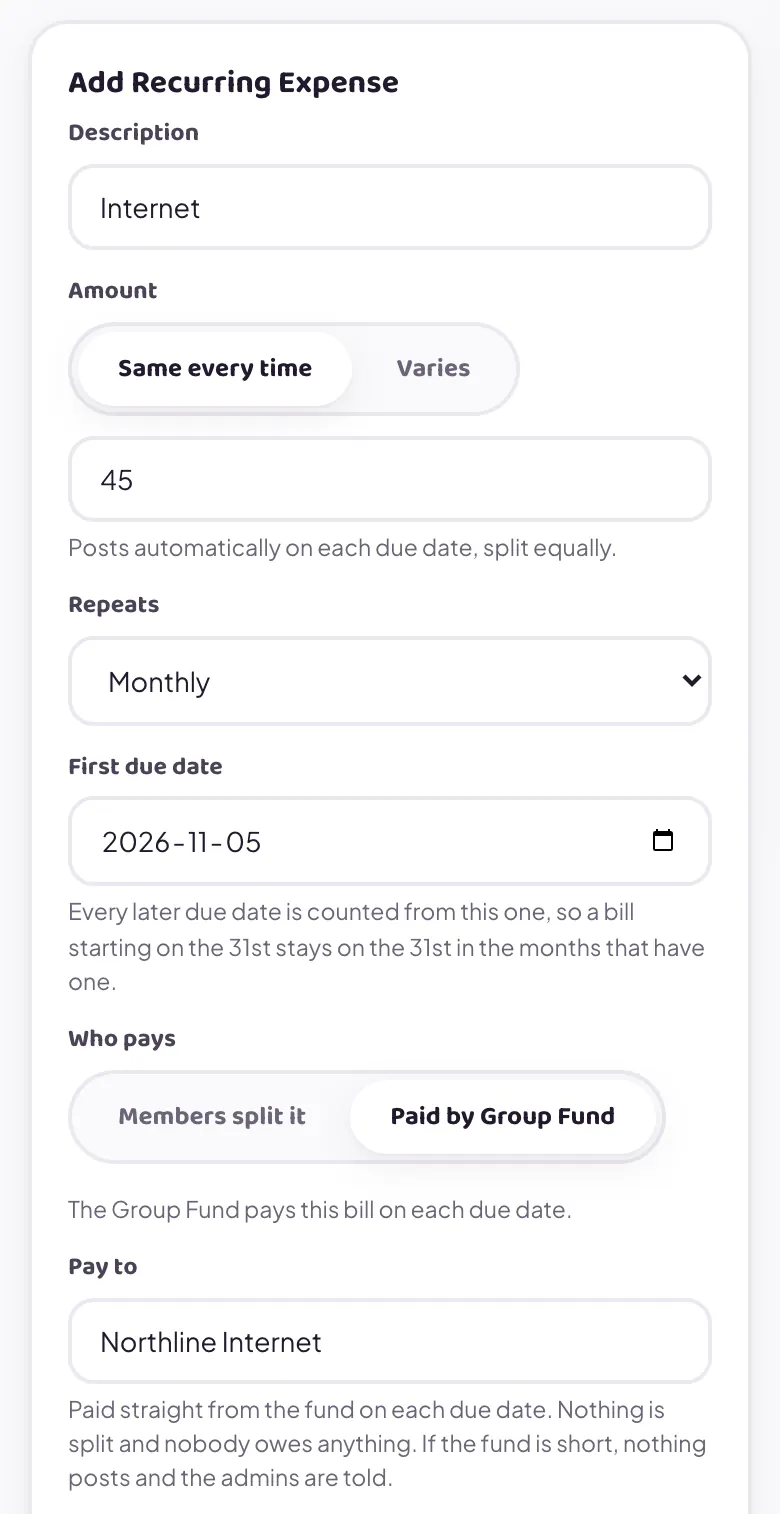
Recurring expenses are an optional feature that an admin switches on for the group. When you add one, under Who pays choose Paid by Group Fund and type who gets paid. On each due date the bill comes straight out of the fund. Nothing is split between members. If the fund is short, the bill is not posted and the admins are told.
How it works
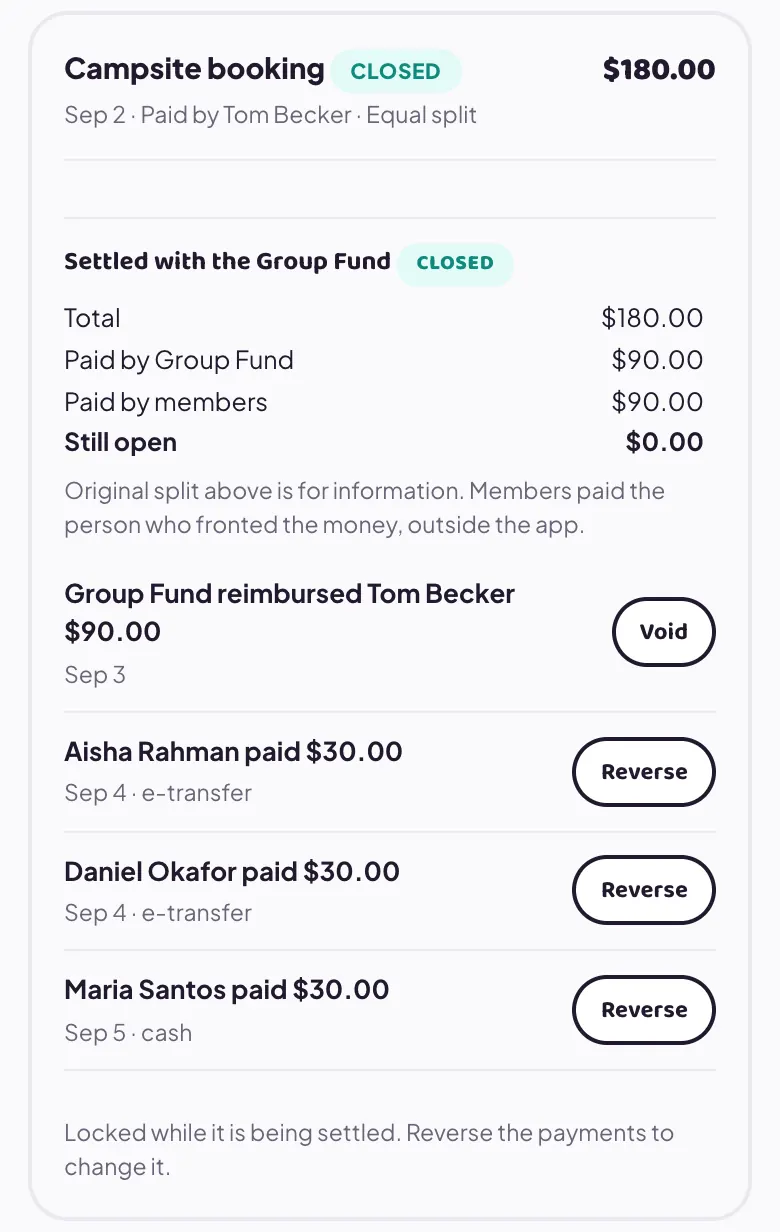
- Open the expense and tap Settle with Group Fund.
- Choose a percent of the total, or a dollar amount, and a category. The fund pays that amount to the person who paid upfront.
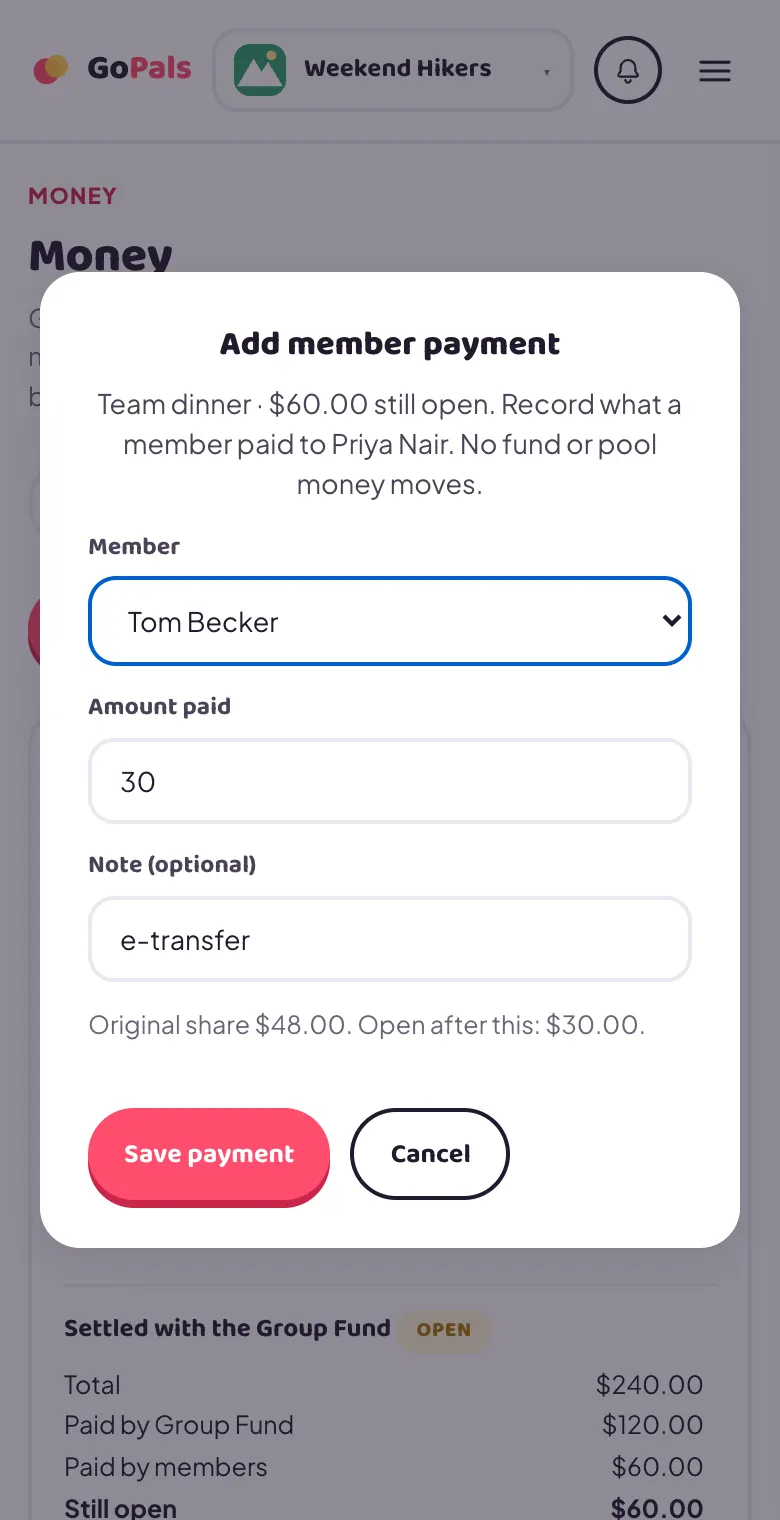
- Members pay the rest to that person outside the app. For each one, tap Add member payment and enter what they paid.
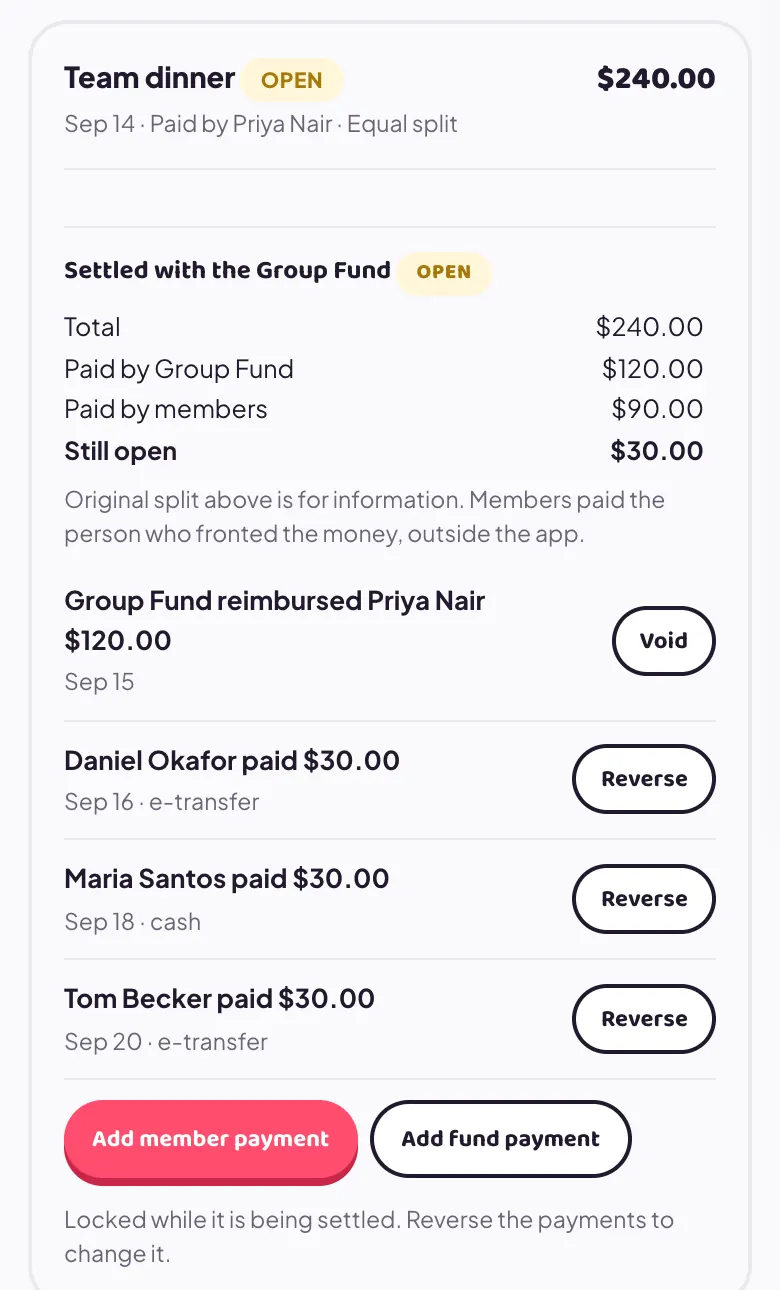
- The expense shows Open until it is fully covered, then Closed.
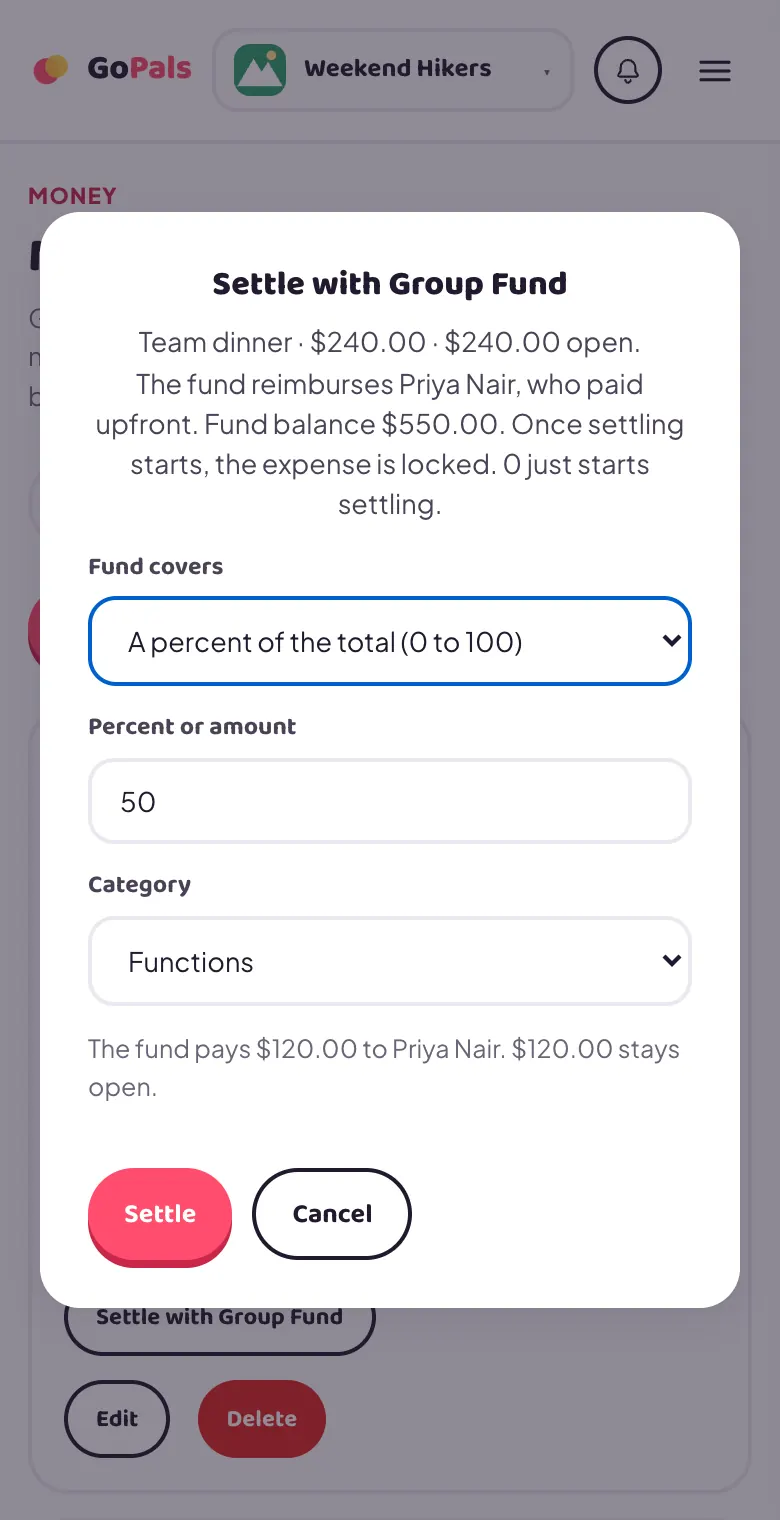
Once settling starts, the expense is locked: it cannot be edited or deleted. If nothing has been applied yet you can tap Stop settling to unlock it. Entering 0 starts settling without any fund money. A mistaken fund payment can be voided and a member payment can be reversed, and the expense reopens.
Does GoPals actually move money?
No. GoPals only tracks who's contributed and who owes what. Any real payment (e-transfer, cash, whatever your group uses) still happens directly between members, outside the app.
I logged a contribution and it's not showing in my balance, why not?
A regular member's own contribution stays pending until an admin confirms it. Check the Pool Statement for its status: it'll say pending until an admin approves it, unless you're an admin yourself, in which case it counts the moment you log it.
Can other members see my pool contributions?
Yes. The Pool Statement, including every entry's amount, note, date and status, is visible to every member of the group, not just admins.
An admin added me by email but I haven't joined the group, what's wrong?
Make sure you're signing in with the exact Google account whose email the admin typed in. If there's any chance of a typo or a dot placed differently than your real Gmail address, that's the most likely cause: GoPals doesn't currently treat differently-dotted Gmail addresses as the same account.
What is the difference between the Pool and the Group Fund?
Pool money is held for members and can be refunded. Group Fund money belongs to the group and is spent on group costs. Every member can see the fund's statement.
I added money to the Group Fund and it is Pending, why?
An admin has to approve a member's deposit before it counts. If you paid from your pool balance, that amount is held until then.
Why can't I edit an expense?
Only the person who added it or an admin can. It is also locked once it is being settled with the Group Fund, or after an activity's settlement has started.
Can I be a member of more than one group?
Yes, switch between your groups any time from the group name at the top of the sidebar (or the group pill on mobile).